

How do I setup Big Red Book so that I can Email Invoices/Statements?
Go to Setup on the top of your company – then choose Company Details – Email Settings – here you’ll be faced with a screen similar to the below:
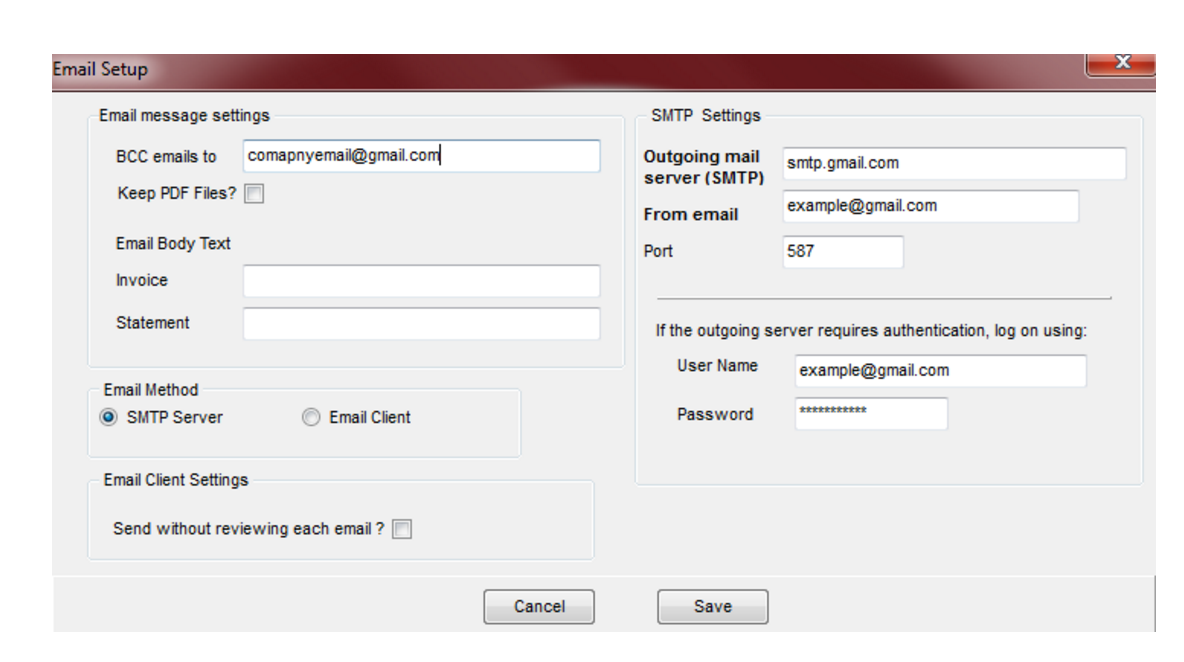
Enter your SMTP Server information and save. – if you are unsure of your SMTP Server info, please contact your email hosting provider.
Click into the ‘Invoice’ field and enter the Email Body Text(e.g. Invoice from ‘your company’…), and ‘BCC’ (if relevant, i.e. if you wish to track sent emails, you could type your own email address in there). Click into the ‘Statements’ and do the same for statements.
Click ‘Save’.
Click ‘Setup’ – ‘Customers’.
Highlight the customer that you want to enter their email address.
Click ‘Change’.
Type their email address into ‘Email’.
Click ‘Save’.
Do the same for any other customers where you want to add their email address.
You are now ready to start emailing customer invoices, credit notes and statements.